The AED 3 with Wi-Fi can be set up to send clinical and/or device check files for CaseReview and/or DeviceDashboard (and DefibDashboard) customers respectively. To enable these transfers, enter the system configuration menu and follow these steps below.
CASEREVIEW CUSTOMERS:
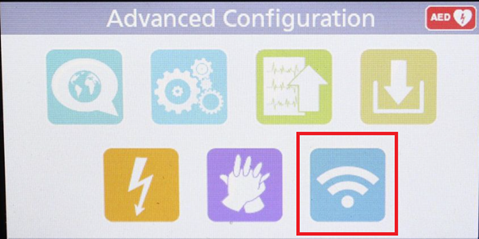
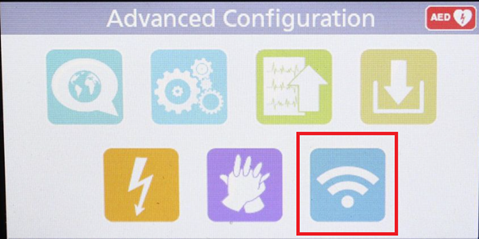
- Tap on the Wi-Fi Button:
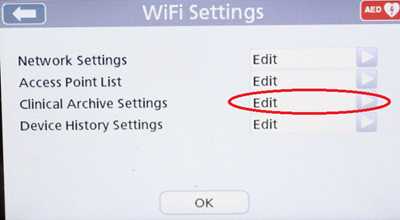
- Tap ‘Edit’ for the “Clinical Archive Settings:”
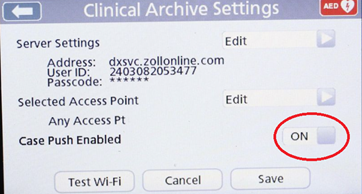
- Ensure “Case Push Enabled” is set to ‘ON’ then tap ‘Save’
DEVICEDASHBOARD/DEFIBDASHBOARD CUSTOMERS:
- Tap on the Wi-Fi Button:
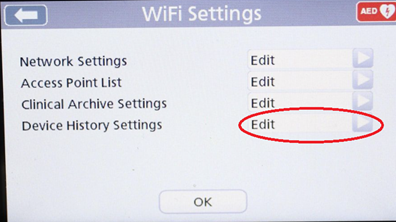
- Tap ‘Edit’ for the “Device History Settings”
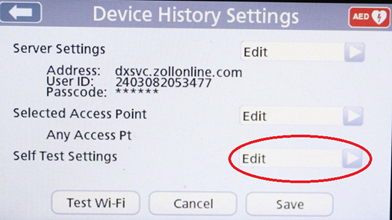
- Tap ‘Edit’ for the “Self-Test Settings”
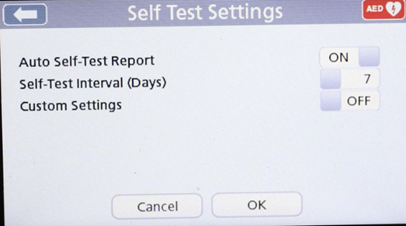
- Ensure “Auto Self-Test Report” is set to ‘ON’
- You can change your Self-Test Interval set a custom Self-Test Day and time here if desired – due to the impact on battery life, you may not want to set your self-test for more frequently than every 7 days.
- You can change your Self-Test Interval set a custom Self-Test Day and time here if desired – due to the impact on battery life, you may not want to set your self-test for more frequently than every 7 days.
- Once all the settings have been confirmed, tap ‘OK’ then ‘Save’ to commit any changes.