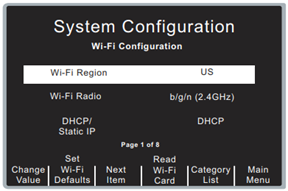
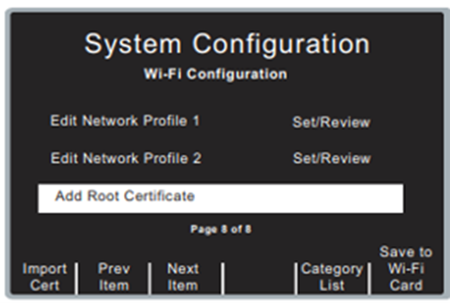
Changing the settings on an Existing Wireless Card is simple. To do so:
- Have the Wi-Fi Card you wish to edit installed into the ZOLL R-Series defibrillator
- Enter System Configuration mode on the defibrillator
- Press the ‘Wi-Fi’ softkey
- While the “Wi-Fi Region” is highlighted wait for the ‘Read Wi-Fi Card’ softkey to appear
- Press ‘Read Wi-Fi Card’ - WAIT for the “Wi-Fi card Read OK” message
- Press ‘Next Item’ until you highlight the criteria you are wishing to edit/change
- Once all necessary changes are made, you will need to save them to the wireless card – press ‘Next Item’ until you highlight the “Add Root Certificate” field.
- Press the ‘Save to Wi-Fi Card’ softkey
- WAIT until you see the “Wi-Fi Card write OK” message. After that displays, it is now safe to turn the defibrillator off and test the connectivity.